Zimbra Tips: Drag and drop Zimlet
Please note: As of January 1, 2017, XMission no longer sells DSL services.
This week I have another great XMission Zimbra discovery to share with you! This tip has to do with enhancing the drag-and-drop capabilities built into the Zimbra web interface when using the Firefox browser.
Our mighty email administrator, Joaquin, has added a great Zimlet to all XMission’s Standard and Premium Zimbra configurations. (XMission’s Base product does not include this feature.) This Zimlet allows you to drag and drop files directly to your Compose window and Briefcase in Firefox. Yes, it is just that easy using Firefox!
You can read about this plugin on its info page, or simply download the file now. Install this to your browser for some Firefox and Zimbra good times!
How to use:
Compose: To use the drag-and-drop feature, you must drop the file you wish to load directly on top of the grey text in the Compose window which reads, “Tip: drag and drop files from your desktop to add attachments to this message.” If you try to drop your item in the body of the Compose window it will not work.


Example of the Zimbra drag-and-drop text found in your Compose window.
Briefcase: Simply drag the file and drop it in the parent directory window. Easy enough!
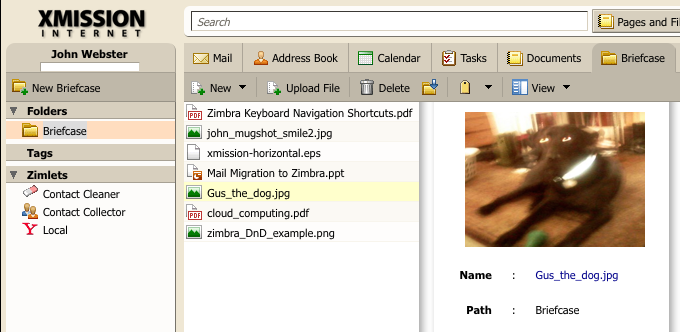
Zimbra Briefcase view - drop your file in the first column. Easy!
Caveats:
- Using the drag-and-drop feature over your office network connection, your uploads should be pretty fast. When using DSL or Dialup please understand that the upload lacks a progress bar. It may act like you did nothing, but the little “page loading” circle will run in the upper right corner of your browser window. Once the upload is completed your file should show up.
- You cannot use the drag-and-drop feature when launching a separated Compose window. It only works withing the primary Zimbra Suite window.
- Included with XMission Standard and Premium Zimbra suites.
- Only Firefox is supported. Consider this a perk for using Open Source software!
Thanks to the email team for the continued progress!
Another great usability tip for Firefox is to use the DragDropUpload add-on. With this you can drop files into attachment boxes instead of browse for them or type in the filename. Drop multiple files and fill all the entries. It is very cool!
If you have any requests on Zimbra topics you would like to see covered in my blog posts please drop me a line. I also offer live training for companies looking to migrate to Zimbra Standard and Premium level services. There are some tips and tricks that make the transition much easier and the end-user experience much more enjoyable.
Talk to you soon!




Zimbra Tips: Use Briefcase as Remote Drive Marvin Hamlisch tix gone
Comments are currently closed.
I tried this with ff in OSX. Doesn’t work for dropping files into the briefcase which is why I installed it.
http://bugzilla.zimbra.com/show_bug.cgi?id=24694 Upload Progress Indicator for DnD Ext
http://bugzilla.zimbra.com/show_bug.cgi?id=24862 Update common zimlets with attribute to load in detached windows
http://bugzilla.zimbra.com/show_bug.cgi?id=27153 Multi-Browser/Platform is planned with http://browserplus.yahoo.com
Using it in the HTML web-client: http://bugzilla.zimbra.com/show_bug.cgi?id=31751
Hi Mace,
This is supported by the XMission mail server. You are using the Open Source Edition on your own mail server. You need to install it server-side before it will work with your browser.
Thanks for reading our blog.
its not working on ipad
can anybody help for this to work on even ipad?
This Zimlet is specific to Firefox and will not work with Safari. The ipad does not allow you to drag files from “desktop” to an open application as there is no “desktop” on the ipad. There is no Firefox browser for the ipad.